

The Ultimate Meta Ads Guide for 2026: From Zero to Advanced
Meta Ads is the advertising system that lets you pay to show your business to people on Facebook, Instagram, Messenger, and the Audience Network, using data and machine learning to find the exact people most likely to buy, sign up, or engage with what you offer. By the end of this guide, you’ll know how to set up your accounts correctly, install tracking that actually works, build campaigns that convert, and read your results like a professional media buyer. This isn’t a “how to boost a post” article — it’s the deep, structured version of what agencies charge thousands of dollars to teach. You won’t need another Meta Ads resource after this one.
If you’ve ever felt overwhelmed opening Meta Ads Manager for the first time — too many buttons, too many acronyms, nobody explaining why you’re clicking what you’re clicking — this guide fixes that. We’re going to build your knowledge the same way a good mentor would: one layer at a time, with nothing skipped and nothing assumed.
Table of Contents
1. What Is Meta Ads (The Ultimate Meta Ads Guide for 2026)
Meta Ads is the umbrella advertising platform owned by Meta Platforms Inc., the parent company of Facebook, Instagram, Messenger, and WhatsApp. When you run a “Meta Ad,” you’re not just buying space on Facebook — you’re tapping into a single, unified system that can place your ad across Facebook feeds, Instagram Reels, Messenger inboxes, and thousands of partner apps and websites in the Audience Network.
Here’s the simplest way to think about it: Meta Ads is a marketplace. You’re not the only advertiser bidding for a person’s attention. Every time someone opens Instagram, dozens of businesses are competing, in real time, for that one ad slot in their feed. Meta’s job is to figure out, in milliseconds, which ad that specific person is most likely to care about — and your job is to give Meta everything it needs to make that decision in your favor.
2. A Short History: From Facebook Ads to Meta Ads
Facebook launched its first ad product back in 2004, but the platform advertisers actually recognize today — the auction-based, targeting-driven system — really took shape between 2007 and 2012, with the introduction of Facebook Pages, the News Feed, and later, mobile app install ads.
Instagram was acquired in 2012 and folded into the same ads infrastructure a few years later, which is why, even now, you manage both platforms from one dashboard. In October 2021, Facebook the company rebranded to Meta Platforms Inc., signaling a broader ambition beyond a single social network — the metaverse, AI, and a unified family of apps. “Facebook Ads Manager” became “Meta Ads Manager,” and “Facebook Business Manager” became “Meta Business Suite.”
This wasn’t just a name change. Along with the rebrand came a genuine shift in how ads are built and optimized. Manual, granular targeting (the kind that made Facebook Ads famous in the 2015–2019 era) has steadily given way to AI-driven, broad-targeting systems like Advantage+ — because Meta’s machine learning got good enough to find your customers better than most humans manually stacking interest filters ever could.
If you learned Facebook Ads five or more years ago and haven’t touched it since, be warned: a huge portion of what used to work is now outdated. This guide reflects how Meta Ads actually works in 2026, not how it worked in 2019.
Why Meta Changed From “Facebook” to “Meta”
- To reflect a company strategy spanning multiple apps (Facebook, Instagram, WhatsApp, Messenger) and future technologies, not just one social network.
- To unify branding across business tools (Ads Manager, Business Suite, Commerce Manager).
- To position the company for AI and immersive technology investment beyond social media.
3. The Meta Ecosystem Explained
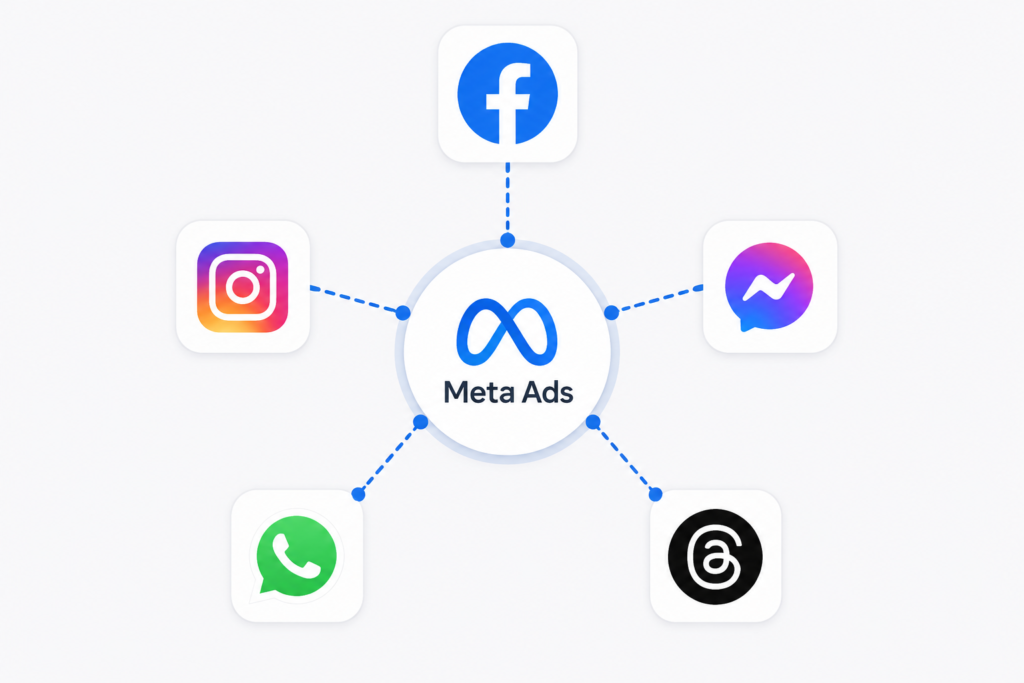
When you launch a Meta Ads campaign, you’re choosing (or letting Meta choose) where across this ecosystem your ad will appear.
Facebook: Still the largest single app by user base globally, and the strongest platform for reach, community-driven businesses, local services, and older demographics (35+). Facebook Feed, Facebook Reels, Facebook Stories, Facebook Marketplace, and the right-hand column are all placements within Facebook.
Instagram: The strongest platform for visual products, ecommerce, fashion, beauty, fitness, and younger demographics (18–34). Instagram Feed, Instagram Stories, Instagram Reels, and Instagram Explore are the main placements here.
Messenger: Ads can appear directly inside a person’s Messenger inbox, or you can run “Click to Messenger” ads that open a chat with your business from a Facebook or Instagram ad. Extremely effective for lead generation and conversational commerce, especially in markets where WhatsApp or Messenger is the default communication channel.
Audience Network: A network of third-party mobile apps and websites where Meta places ads outside its own apps, extending your reach further. Performance here varies a lot by industry, and many advertisers choose to exclude it for brand-sensitive campaigns.
Threads: Meta’s text-based platform (launched in 2023) has steadily opened up to advertisers, and by 2026 it’s a selectable placement in Ads Manager for many account types, particularly useful for text-forward brands, media companies, and thought-leadership-driven businesses.
WhatsApp While WhatsApp isn’t a traditional ad placement in the same sense, “Click to WhatsApp” ads (which open a WhatsApp conversation) have become one of the fastest-growing ad formats globally, especially in India, Brazil, and Southeast Asia.
| Platform | Best For | Typical Audience |
| Local business, community, leads, older demographics | 35+ | |
| Visual products, ecommerce, lifestyle brands | 18-34 | |
| Messenger | Conversational sales, lead qualification | All Ages |
| Threads | Extended reach, app installs | 18-34 |
| Text-led brands, thought leadership | Region-Dependent | |
| Audience Network | High-touch sales, local commerce | Varies |
4. How Meta Ads Actually Works: The Algorithm, Auction, and Machine Learning
This is the section most courses rush through — and it’s exactly the section that separates people who “run ads” from people who actually understand what they’re doing.
The Auction System
Every single time an ad slot becomes available — someone opens their Instagram Feed, for example — Meta runs an instant auction between all eligible advertisers targeting that person. But here’s the part that confuses beginners: the highest bidder does not automatically win.
Meta calculates a “Total Value” score for each competing ad using three components:
- Advertiser Bid — what you’re willing to pay (directly, or as calculated by your bid strategy).
- Estimated Action Rate — how likely Meta thinks this specific person is to take your desired action (purchase, click, sign up, etc.).
- Ad Quality and Relevance — based on feedback signals like negative comments, hides, and how people have historically responded to similar ads.
The ad with the highest combined score wins the slot — not the highest bid. This is why two advertisers with the same budget can get wildly different results: one has a genuinely relevant, well-targeted, well-made ad, and the other doesn’t.
The Learning Phase
When you launch a new ad set, or make a significant edit to one, it enters what Meta calls the Learning Phase. During this period, the delivery system is still gathering data about who responds to your ad, so performance is often unstable — costs might spike, then drop, then spike again.
Meta generally needs around 50 optimization events (e.g., 50 purchases, 50 leads) within a 7-day window per ad set to exit the learning phase and reach stable delivery. If an ad set doesn’t hit that threshold, it stays in “Learning Limited,” which usually means inconsistent, more expensive results.
Why this matters practically:
- Don’t panic-edit a campaign every 6 hours. Every significant edit can reset the learning phase.
- Don’t split your budget across 10 tiny ad sets that individually can never reach 50 conversions a week.
- Consolidate. Fewer, better-resourced ad sets almost always outperform many fragmented ones.
Machine Learning and Signal Feedback
Meta’s ad system is fundamentally a feedback loop. Every action a user takes — scrolling past your ad, watching 3 seconds of your video, clicking through, adding to cart, purchasing, or purchasing again next month — becomes a signal that trains the algorithm on what “success” looks like for your specific ad set.
This is why tracking (which we cover in Section 6) is not optional. If Meta can’t see your conversions, it cannot optimize toward them. You could have the best product in the world and still get poor results simply because the system doesn’t know who’s actually buying.
5. Complete Account Setup (Step by Step)
This is the foundation. Get this wrong, and everything downstream — tracking, billing, permissions — becomes harder to fix later. Take your time here even if it feels tedious.
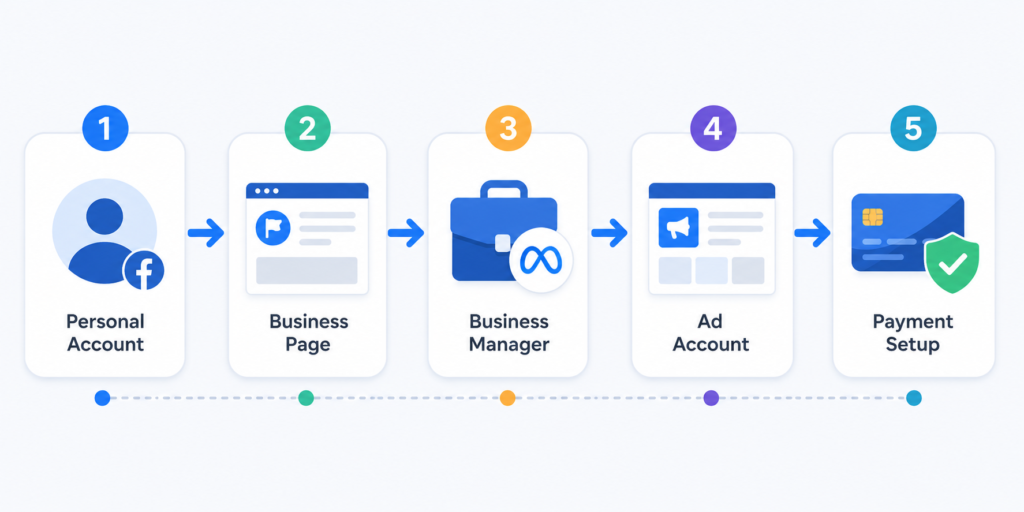
Step 1: Create a Personal Facebook Account
You cannot run Meta Ads without a personal Facebook profile behind the scenes — even if you’ll never post on it. This account becomes your login identity for Business Manager. Use your real name and real details; Meta actively restricts ad accounts tied to fake profiles, especially after 2024’s tightened identity verification rules.
Step 2: Create a Facebook Page
Your Facebook Page is your business’s public identity on Meta platforms — it’s what appears as the advertiser name on every ad you run, whether on Facebook or Instagram.
To create one: go to Meta Business Suite or facebook.com/pages/create, choose a Page name (usually your business name), select a category, and add a profile photo and cover image. Keep your Page name consistent with your actual brand — Meta reviews Pages for authenticity, and mismatched names can slow down ad approval.
Step 3: Switch to Professional Mode (If Using a Personal-Style Profile)
If you’re managing your presence through an Instagram account rather than starting from a Page, switch that Instagram account to Professional Mode (Business or Creator account) via Settings > Account Type. This unlocks insights, ad tools, and the ability to link the account to Business Manager.
Step 4: Set Up a Business Portfolio (Business Manager)
Business Manager — now often referred to as your Business Portfolio inside Meta Business Suite — is the control center where you manage Pages, ad accounts, Pixels, catalogs, and team permissions in one place, separate from your personal profile.
To create one: visit business.facebook.com, click “Create Account,” enter your business name, your name, and your business email. Use a company email address (not a free Gmail) where possible — it helps with verification later.
Step 5: Meta Business Suite
Meta Business Suite is the day-to-day dashboard for managing your Page, Instagram account, inbox messages, content calendar, and ads — all from one place. Once your Business Portfolio is created, Business Suite becomes your home base.
Step 6: Business Verification
For higher ad spend limits, better account trust, and access to certain features (like Advantage+ catalog ads or expanded audience sizes), Meta requires Business Verification — confirming your business’s legal name, address, and phone number, usually alongside a registration document (business license, tax ID, or incorporation certificate).
Go to Business Settings > Security Center > Business Verification, and follow the prompts. This can take anywhere from a few hours to several days.
Step 7: Domain Verification
If you run traffic to your own website, verify your domain in Business Settings > Brand Safety > Domains. This matters more than most beginners realize — it protects your ability to configure Aggregated Event Measurement (covered in Section 6) and prevents other advertisers from hijacking your domain’s Open Graph metadata.
Verification methods include:
- Adding a DNS TXT record through your domain registrar (most reliable).
- Uploading an HTML file to your site’s root directory.
- Adding a meta tag to your site’s header.
Step 8: Create Your Ad Account
Inside Business Settings > Accounts > Ad Accounts, click “Add” > “Create a New Ad Account.” Set your ad account name, time zone, and currency carefully — time zone and currency cannot be changed later without creating a whole new ad account, so double-check before confirming.
Step 9: Billing Setup and Payment Methods
Navigate to Business Settings > Payments, and add a valid payment method — credit card, debit card, or PayPal, depending on your region. Some countries also support manual/prepaid billing (pay in advance rather than being charged after spend), which is useful for agencies and advertisers who want tighter spend control.
Warning: Never share your ad account’s billing access with anyone you don’t fully trust. Unauthorized billing access is one of the most common ways small businesses lose thousands of dollars to unrecognized ad spend.
Step 10: Business Settings, Roles, and Permissions
Inside Business Settings, you can assign team members specific roles:
- Admin — full control, including billing and adding/removing people.
- Employee/Advertiser — can create and manage campaigns, but limited administrative access.
- Analyst — view-only access to performance data.
Always follow the principle of least privilege: only give people the access level they actually need.
Step 11: Security and Two-Factor Authentication
Enable Two-Factor Authentication (2FA) on both your personal Facebook login and your Business Manager account. Use an authenticator app (like Google Authenticator or Authy) rather than SMS where possible — SIM-swap attacks specifically target advertisers because ad accounts are a known target for hijackers.
Setup Checklist
- Personal Facebook account created with real identity
- Facebook Page created and branded correctly
- Instagram account set to Professional Mode and linked
- Business Portfolio (Business Manager) created
- Business Verification completed
- Domain verified
- Ad account created with correct currency/time zone
- Payment method added
- Roles and permissions assigned correctly
- 2FA enabled on all accounts
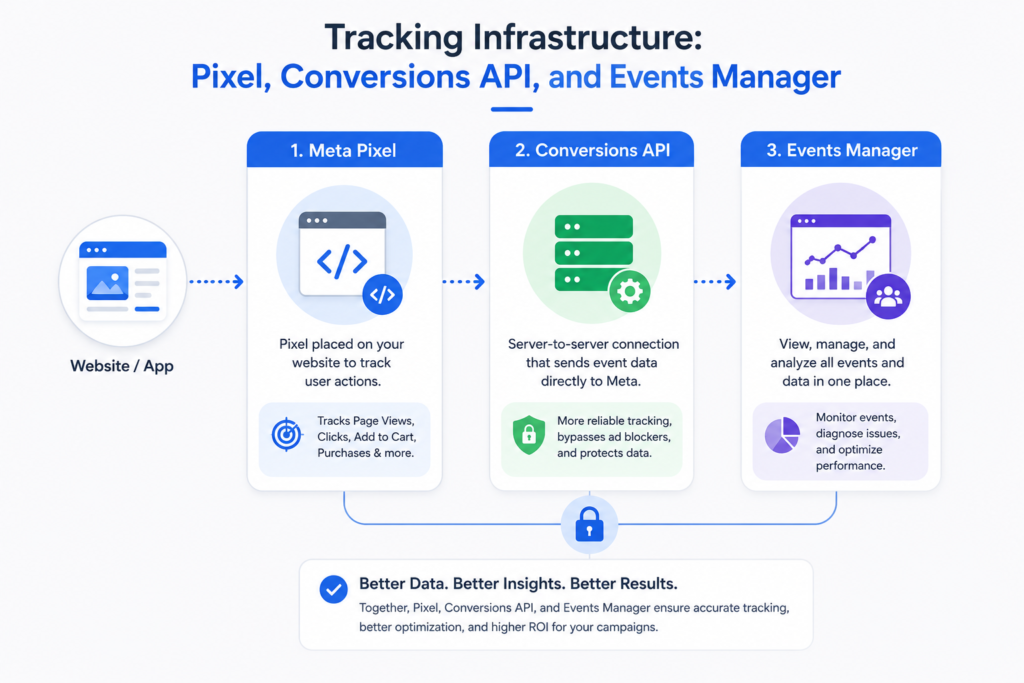
6. Tracking Infrastructure: Pixel, Conversions API, and Events Manager
If Section 5 was the foundation, this section is the nervous system. Without proper tracking, Meta’s machine learning is flying blind — and no amount of clever campaign strategy fixes bad data.
What Is the Meta Pixel?
The Meta Pixel is a small piece of code you place on your website that tracks visitor behavior — page views, add-to-carts, purchases, sign-ups — and reports that data back to Meta. This is how Meta knows who actually converted after seeing or clicking your ad, and it’s how the algorithm learns to find more people like them.
What Is Conversions API (CAPI)?
Conversions API is a server-side tracking method that sends the same event data directly from your website’s server to Meta, rather than relying solely on the visitor’s browser (which the Pixel depends on).
Why does this matter? Browser-based tracking (the Pixel alone) has become increasingly unreliable because of ad blockers, iOS privacy restrictions (since Apple’s App Tracking Transparency changes in 2021), and browser cookie restrictions. CAPI acts as a backup — and in many cases, a primary — data channel that isn’t affected by those browser-side limitations.
By 2026, running Pixel and CAPI together (not one or the other) is considered the baseline standard, not an advanced technique. Meta explicitly rewards advertisers using both with better Event Match Quality scores and more stable optimization.
Events Manager
Events Manager is where you view, verify, and manage all the data flowing in from your Pixel and CAPI setup. It shows:
- Which events are firing (PageView, AddToCart, Purchase, etc.)
- Event Match Quality scores (higher = better data matching to real people)
- Diagnostics and errors
- Test Events tool for real-time debugging
Standard Events vs. Custom Events
Standard Events are Meta’s pre-defined set of common actions: PageView, ViewContent, AddToCart, InitiateCheckout, AddPaymentInfo, Purchase, Lead, CompleteRegistration, Search, Subscribe, StartTrial, and others. Always use standard events wherever your action fits one — Meta’s optimization tools are built around them.
Custom Events are events you define yourself for actions that don’t fit a standard category — for example, “WatchedDemoVideo” or “BookedConsultCall.” Use these sparingly, and only when no standard event genuinely fits, because custom events don’t benefit from the same level of built-in optimization support.
Aggregated Event Measurement (AEM)
Since Apple’s iOS 14.5 privacy update, Meta introduced Aggregated Event Measurement to comply with limited user-level tracking on iOS devices. AEM allows advertisers to measure a maximum of 8 prioritized conversion events per domain, ranked in order of business importance (e.g., Purchase ranked above ViewContent).
This is why Domain Verification (Section 5) matters so much — you can’t configure your 8 prioritized events without a verified domain, and without that configuration, your iOS conversion data becomes significantly less reliable.
Installing the Pixel
- Go to Events Manager > Connect Data Sources > Web.
- Choose “Meta Pixel” and name it (usually your business name).
- Install it via a partner integration (Shopify, WordPress, Google Tag Manager) — the easiest and most reliable route for non-developers — or manually paste the base code into your site’s
<head>tag. - Set up standard events on the relevant pages (Purchase on your order confirmation page, Lead on your form thank-you page, etc.).
Verifying and Testing Events
Use the Test Events tool inside Events Manager to fire a test action on your site and confirm Meta receives it correctly in real time. Check that:
- The right event name is firing on the right page.
- Parameters (value, currency, content ID) are populating correctly.
- Duplicate events aren’t firing twice (a common issue when both Pixel and CAPI send the same event without deduplication).
Common Pixel Troubleshooting Issues
| Problem | Likely Cause | Fix |
|---|---|---|
| Pixel not firing at all | Code not installed / installed on wrong pages | Reinstall via Tag Manager or platform integration |
| Duplicate events | Pixel and CAPI both firing without a shared event ID | Add matching event_id parameters to deduplicate |
| Low Event Match Quality | Missing customer info (email, phone, name) in events | Pass hashed customer data through CAPI |
| Events delayed or missing | Ad blockers, browser restrictions | Rely more heavily on CAPI |
| Wrong currency showing | Ad account currency mismatch | Set currency parameter explicitly in event code |
7. Understanding Audiences
Audiences determine who sees your ad. This is arguably the single most misunderstood part of Meta Ads by beginners — mostly because the “right” approach has changed dramatically as Meta’s AI has matured.
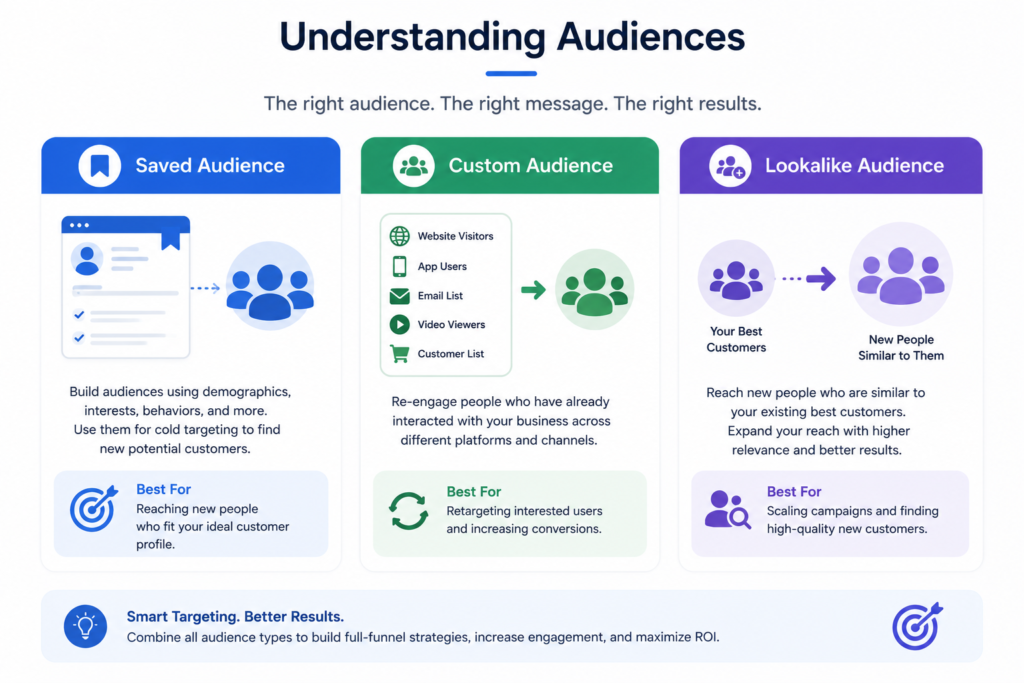
Saved Audiences
A Saved Audience is built manually using demographics, locations, interests, and behaviors — the classic “old-school” Facebook Ads targeting method (e.g., “Women, 25–45, interested in yoga, living in Mumbai”). It’s still available and still useful for niche B2B or highly specific local targeting, but for most advertisers in 2026, it’s no longer the primary tool — broad, AI-driven targeting generally outperforms it once you have tracking data feeding the system.
Custom Audiences
Custom Audiences let you target people based on data you already have:
- Customer List — upload emails or phone numbers of existing customers (matched anonymously and securely).
- Website Traffic — people who visited your site, tracked via Pixel/CAPI (this is retargeting).
- App Activity — people who used your app.
- Engagement — people who interacted with your Facebook Page, Instagram profile, or previous ads (liked, commented, watched a video, opened an Instant Experience).
Lookalike Audiences
A Lookalike Audience takes a source audience (like your best customers or Pixel purchasers) and finds new people who share similar characteristics, ranked by similarity (1% being the closest match, up to 10% for broader reach). Lookalikes remain one of the highest-performing audience types for scaling, provided your source audience is large enough (Meta recommends at least 100 people, though 1,000+ produces meaningfully better matches).
Retargeting
Retargeting is simply running ads to people who already interacted with your business — website visitors, cart abandoners, video viewers, past purchasers. It’s almost always your highest-converting, lowest-cost audience because these people already know who you are.
Common retargeting windows:
- 7-day website visitors (hot)
- 14–30 day website visitors (warm)
- Cart abandoners (very hot — often the highest-converting segment overall)
- Past purchasers (great for repeat purchase or upsell campaigns)
Interest and Behavior Targeting
Interest targeting reaches people based on pages they’ve liked, content they engage with, and stated interests. Behavior targeting uses actions like device usage, travel patterns, or purchase behavior. Both still exist inside Saved Audiences, but by 2026 they mostly serve as signals fed into Advantage+ audience expansion rather than hard filters advertisers manually stack.
Broad Targeting
Broad targeting means setting minimal or no interest restrictions — just age, gender, and location — and letting Meta’s algorithm find the right people using its own signal data. Counterintuitively, broad targeting frequently outperforms narrow targeting once your Pixel has enough conversion data, because you’re not artificially restricting the algorithm’s ability to find good matches outside the box you defined.
Audience Expansion and Audience Signals
Audience Expansion allows Meta to go beyond your defined targeting when it predicts better performance outside those boundaries. Audience Signals (used within Advantage+ Audience) let you feed Meta hints — like a Custom Audience or a few interests — without hard-locking targeting to only those signals, giving the AI room to explore while still pointing it in the right direction.
AI Targeting (Advantage+ Audience)
Advantage+ Audience is Meta’s default AI-driven targeting engine in 2026. Instead of choosing detailed demographics and interests, you provide the system with signals (like a Custom Audience, Pixel data, or minimum age/location), and Meta’s machine learning handles the rest — dynamically adjusting who sees your ad based on real-time conversion likelihood.
| Audience Type | Best Use Case | Data Needed |
|---|---|---|
| Saved Audience | Niche/local targeting, B2B | None |
| Custom Audience | Retargeting known contacts | Customer list, Pixel data |
| Lookalike Audience | Scaling to new, similar customers | Source audience (100+ people) |
| Advantage+ Audience | Most cold campaigns in 2026 | Pixel/conversion signals |
8. Campaign Structure: Campaign, Ad Set, Ads
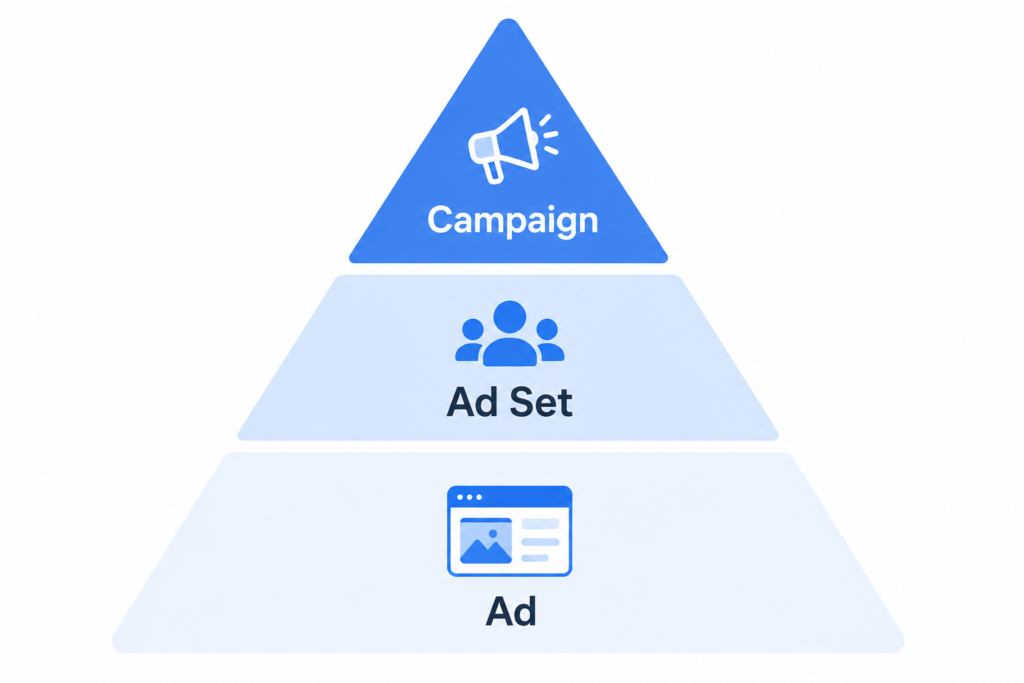
Every Meta Ads campaign is built in three layers, and understanding what belongs at each layer is essential before you touch anything else.
Campaign Level — This is where you choose your objective (what outcome you want: sales, leads, traffic, etc.) and, if using Advantage+ campaign budget, your overall budget. Everything below inherits this objective.
Ad Set Level — This is where you define your audience, placements, budget (if not set at campaign level), schedule, and optimization event. You can have multiple ad sets inside one campaign, each testing a different audience or targeting approach.
Ad Level — This is where the actual creative lives: images, videos, copy, headlines, and call-to-action buttons. Multiple ads can sit inside one ad set to test different creative variations.
Think of it like a company org chart: Campaign is the department goal, Ad Set is the team assigned to it, and Ads are the individual people doing the work.
Naming Conventions
Consistent naming isn’t cosmetic — it’s how you keep a growing account organized and how you (or a teammate) can understand performance data six months later without opening every single campaign.
A reliable naming formula:
Campaign: [Objective]_[Funnel Stage]_[Date/Version] → e.g., Sales_ColdProspecting_Jul2026
Ad Set: [Audience Type]_[Placement]_[Age/Location if relevant] → e.g., Advantage+Audience_AutoPlacement_IN
Ad: [Creative Type]_[Hook/Angle]_[Version] → e.g., UGC_PainPoint_V1
Campaign Hierarchy in Practice
A simple, effective structure for most small-to-mid businesses looks like this:
Campaign: Sales_Prospecting
└─ Ad Set: Advantage+ Audience (Broad, Auto Placements)
├─ Ad 1: Video UGC
├─ Ad 2: Static Image + Offer
└─ Ad 3: Carousel (Product Showcase)
Campaign: Sales_Retargeting
└─ Ad Set: Website Visitors 14 Days
├─ Ad 1: Testimonial Video
└─ Ad 2: Discount Reminder
9. Every Campaign Objective Explained
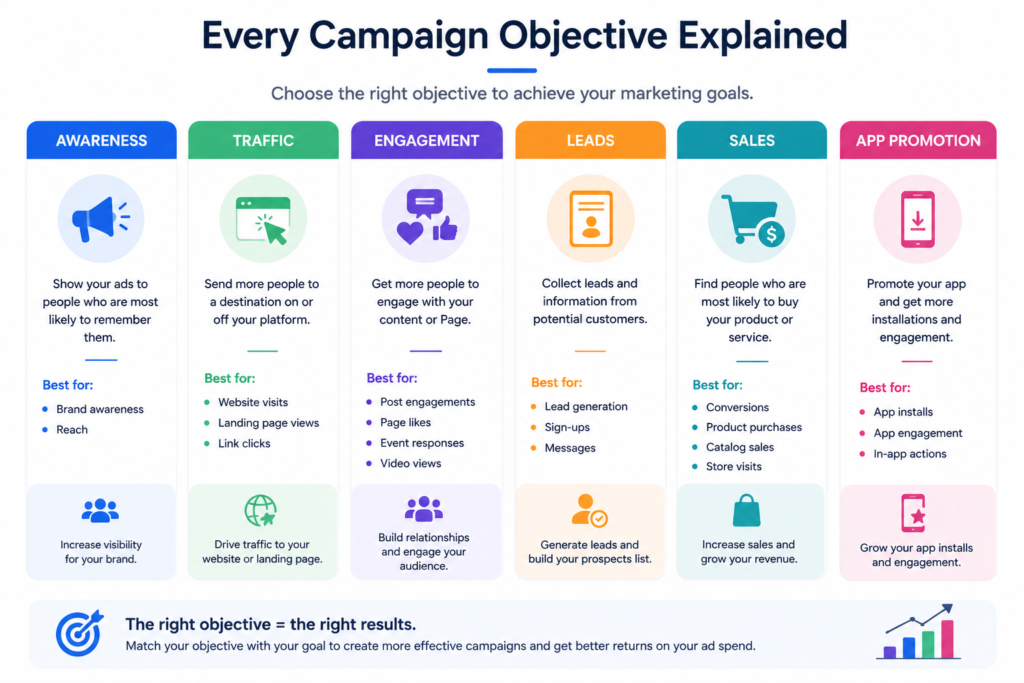
Meta groups objectives into three funnel stages: Awareness, Consideration, and Conversion. As of 2026, the campaign creation screen presents six core objectives (Meta periodically consolidates sub-objectives into these): Awareness, Traffic, Engagement, Leads, App Promotion, and Sales. We’ll cover each in depth, including the classic sub-goals within them, since many readers will recognize the older names too.
9.1 Awareness
Purpose: Maximize the number of people who see your ad and help them remember your brand, measured through reach and estimated ad recall lift.
When to use: Brand launches, entering a new market, building recognition before you have retargeting data to work with, or supporting offline campaigns (events, store openings).
When NOT to use: If you need sales, leads, or any direct action — Awareness doesn’t optimize for that, and using it for a direct-response goal wastes budget.
Advantages: Very low cost per impression; excellent reach; great top-of-funnel volume for later retargeting.
Disadvantages: No direct attribution to revenue; hard to prove ROI to stakeholders who want sales numbers.
Real Example: A new skincare brand with no existing audience runs an Awareness campaign featuring founder-story video content to a broad 18–34 female audience in their launch city, building an initial retargeting pool before running any Sales campaigns.
Best Practices: Use strong, scroll-stopping video in the first 3 seconds; keep frequency in check (don’t oversaturate the same small audience); pair with a retargeting campaign 1–2 weeks later.
KPIs: CPM, Reach, Estimated Ad Recall Lift, Frequency.
Common Mistakes: Running Awareness campaigns indefinitely without ever building a conversion funnel behind them.
9.2 Traffic
Purpose: Drive clicks to a destination — your website, app, Messenger, or WhatsApp — optimizing for link clicks or landing page views.
When to use: Blog content promotion, driving visits to a page you want indexed with real traffic data, or early-stage funnel building when you don’t yet have conversion tracking set up.
When NOT to use: As a substitute for a Sales campaign — Traffic optimizes for clicks, not purchases, so you’ll often get cheap clicks from people unlikely to buy.
Advantages: Cheap cost per click; good for building website traffic and retargeting pools; useful for content-driven businesses.
Disadvantages: Click quality can be low if not paired with Landing Page View optimization; easy to mistake “traffic” for “interested buyers.”
Real Example: A finance blog runs Traffic campaigns to new articles, optimizing for Landing Page Views (not just Link Clicks) to ensure the page genuinely loads and is read, then retargets engaged readers with a lead magnet offer.
Best Practices: Always optimize for Landing Page Views over Link Clicks where possible; make sure your landing page loads fast (page speed directly affects delivery cost).
KPIs: CPC, Landing Page View Rate, CTR.
Common Mistakes: Using Traffic objective to try to generate sales, then blaming Meta Ads for “not working.”
9.3 Engagement
Purpose: Drive interactions — Page likes, post engagement, event responses, Messenger/WhatsApp conversations, or video views — depending on the sub-goal selected.
When to use: Building social proof on a new Page, promoting an event, or running conversation-driven campaigns via Messenger/WhatsApp for lead qualification.
When NOT to use: As your only objective if the end goal is revenue — engagement is a means, not an end.
Advantages: Builds social proof (comments, shares) that improves organic reach and ad credibility; conversation ads (Click-to-Messenger/WhatsApp) can double as genuine lead generation.
Disadvantages: Vanity metrics (likes, comments) don’t always translate to revenue; can attract low-intent engagement if not paired with a clear offer.
Real Example: A local restaurant runs a Click-to-WhatsApp Engagement campaign so nearby users can message directly to book a table, converting engagement into real reservations.
Best Practices: Use Engagement for genuinely conversation-driven businesses (services, high-touch sales); avoid using it purely to inflate post likes.
KPIs: Cost per Engagement, Conversation Rate, Post Shares/Comments.
Common Mistakes: Chasing vanity likes with no plan to convert that attention into revenue.
9.4 Leads
Purpose: Collect contact information — through Instant Forms (native lead forms), Messenger, WhatsApp, calls, or your own website form — optimizing specifically for qualified sign-ups.
When to use: B2B businesses, service businesses, real estate, education, coaching, insurance — anywhere the sales cycle requires a human follow-up rather than an instant online purchase.
When NOT to use: Simple ecommerce with an instant checkout — Sales objective with website conversion tracking is usually more efficient there.
Advantages: Instant Forms remove friction (pre-filled with the user’s Facebook/Instagram info, so no typing needed); great for high-consideration purchases.
Disadvantages: Lead quality varies — Instant Form leads can include low-intent people who filled the form quickly without real interest; requires a strong follow-up process to convert leads into customers.
Real Example: A real estate agency runs a Leads campaign with an Instant Form asking budget range and preferred location, then their sales team calls qualified leads within an hour.
Best Practices: Add qualifying questions to your Instant Form to filter intent; connect your CRM via API or Zapier/Make for instant follow-up; follow up within minutes, not days — lead conversion rates drop sharply after the first hour.
KPIs: Cost per Lead (CPL), Lead-to-Customer Conversion Rate, Form Completion Rate.
Common Mistakes: Collecting leads and letting them sit for days before follow-up; not adding qualifying questions, resulting in a flood of unqualified leads.
9.5 App Promotion
Purpose: Drive app installs and, more importantly by 2026, in-app events (purchases, subscriptions, level completions) — optimizing beyond just the install itself.
When to use: Mobile app businesses, gaming, subscription apps, marketplace apps.
When NOT to use: Early-stage apps without proper SDK/App Events integration — without that data, Meta can’t optimize past the install, and you risk paying for installs from people who never open the app again.
Advantages: Deep integration with app stores and mobile measurement partners (like AppsFlyer, Adjust); can optimize directly for in-app purchases or subscription value.
Disadvantages: iOS tracking limitations (post-ATT) make measurement harder without proper SKAdNetwork configuration; requires more technical setup than most other objectives.
Real Example: A subscription meditation app optimizes App Promotion campaigns for “Start Free Trial” events rather than raw installs, dramatically improving the quality of users acquired.
Best Practices: Set up value-based optimization once you have enough purchase data; configure SKAdNetwork correctly for iOS; use Advantage+ App campaigns for automated, AI-driven scaling.
KPIs: Cost per Install (CPI), Cost per In-App Event, Return on Ad Spend (ROAS) for subscription apps.
Common Mistakes: Optimizing purely for cheap installs and ignoring post-install behavior, resulting in high churn and wasted spend.
9.6 Sales
Purpose: Drive purchases or high-value conversions — the objective most ecommerce and revenue-driven businesses use, optimizing for Purchase or a custom high-intent conversion event.
When to use: Ecommerce stores, service businesses with online checkout, any business where the ad should directly result in a transaction.
When NOT to use: Brand-new websites with zero historical conversion data and no tracking set up — without Pixel/CAPI data, Sales campaigns struggle to optimize and often perform poorly out of the gate.
Advantages: Directly ties ad spend to revenue; supports Advantage+ Shopping campaigns, dynamic product ads, and catalog-based retargeting; the clearest ROI objective of all.
Disadvantages: Requires solid tracking infrastructure to work well; can be expensive during the learning phase if conversion volume is low.
Real Example: An online fashion store runs Advantage+ Shopping campaigns using its full product catalog, letting Meta dynamically show the right products to the right shoppers and retarget cart abandoners automatically.
Best Practices: Make sure Purchase events are firing accurately via Pixel + CAPI before scaling budget; use value-based bidding for stores with varied price points; combine cold Advantage+ Sales campaigns with a dedicated retargeting campaign.
KPIs: ROAS, Cost per Purchase, Average Order Value (AOV), Conversion Rate.
Common Mistakes: Launching a Sales campaign on a brand-new Pixel with zero prior data and expecting immediate profitability — the learning phase needs time and, ideally, some existing conversion history to work from.
| Objective | Best For | Key Metric |
|---|---|---|
| Awareness | Brand launch, reach | CPM, Recall Lift |
| Traffic | Content, top-of-funnel | CPC, LPV Rate |
| Engagement | Social proof, conversations | Cost per Engagement |
| Leads | B2B, services, high-consideration sales | CPL |
| App Promotion | Mobile apps | CPI, Cost per In-App Event |
| Sales | Ecommerce, direct revenue | ROAS |
10. Budgeting and Bid Strategies
Daily Budget vs. Lifetime Budget
A Daily Budget tells Meta how much to spend, on average, per day — actual daily spend can fluctuate up to roughly 25% higher or lower depending on opportunity, but it averages out over a week. A Lifetime Budget sets a total amount to spend over the entire campaign or ad set’s scheduled run, and Meta paces spend across that period, which is useful for time-bound promotions (like a 5-day flash sale).
Advantage+ Campaign Budget
Advantage+ Campaign Budget (formerly Campaign Budget Optimization, or CBO) sets one budget at the campaign level and lets Meta automatically distribute spend across ad sets based on where it’s finding the best results in real time, rather than you manually splitting budget evenly. For most advertisers running multiple ad sets, this outperforms manual per-ad-set budgeting because the algorithm reallocates faster than a human checking data once a day ever could.
Bid Strategies
Bid strategy controls how Meta spends your budget to get results:
- Highest Volume (the default for most campaigns) — Meta spends your full budget to get as many optimization events as possible, without a strict cost target. Best when you’re not yet sure what a “good” cost per result looks like.
- Cost Cap — you set a target average cost per result, and Meta tries to stay near or under it while still spending your full budget. Best once you know your profitable cost-per-result threshold.
- Bid Cap — you set the maximum you’re willing to bid in the auction itself (more granular, more advanced, and generally reserved for experienced media buyers who understand auction dynamics deeply).
- Minimum ROAS — available for Sales campaigns with value optimization; you set a minimum return on ad spend target, and Meta only pursues purchases likely to meet or beat it.
Budget Scaling
When a campaign is performing well and you want to spend more, two approaches exist:
Vertical Scaling — increasing the budget of an existing, proven ad set. Do this gradually: increases of roughly 15–20% every 2–3 days avoid resetting the learning phase too harshly. Jumping budget by 100% overnight often causes a performance dip as the system re-learns.
Horizontal Scaling — duplicating a winning ad set (or campaign) to run additional budget in parallel, rather than inflating one ad set past what its audience can efficiently absorb. This is often more stable than aggressive vertical scaling once an ad set has saturated its audience.
| Bid Strategy | Best For | Risk Level |
|---|---|---|
| Highest Volume | New campaigns, gathering data | Low complexity |
| Cost Cap | Known profitable cost per result | Medium |
| Bid Cap | Advanced auction control | High (needs expertise) |
| Minimum ROAS | Established ecommerce with value data | Medium-High |
11. Placements Explained
Automatic Placements (Advantage+ Placements) let Meta decide where your ad shows — across Facebook, Instagram, Messenger, and Audience Network — based on where it predicts the best results for your budget. This is the recommended default for the vast majority of campaigns, because it gives the delivery system maximum flexibility to find efficient impressions.
Manual Placements let you handpick specific placements — useful when you have a strong strategic reason, such as a vertical 9:16 video that only makes sense in Stories/Reels, or a brand safety requirement to exclude Audience Network entirely.
Where ads can appear:
- Facebook Feed, Facebook Reels, Facebook Stories, Facebook Marketplace, Facebook Video Feeds, Facebook right-hand column
- Instagram Feed, Instagram Stories, Instagram Reels, Instagram Explore, Instagram Profile Feed
- Messenger Inbox, Messenger Stories
- Audience Network (native, banner, interstitial, rewarded video)
- Threads Feed
- Search Results (Facebook/Instagram search placements)
12. Ad Formats Explained
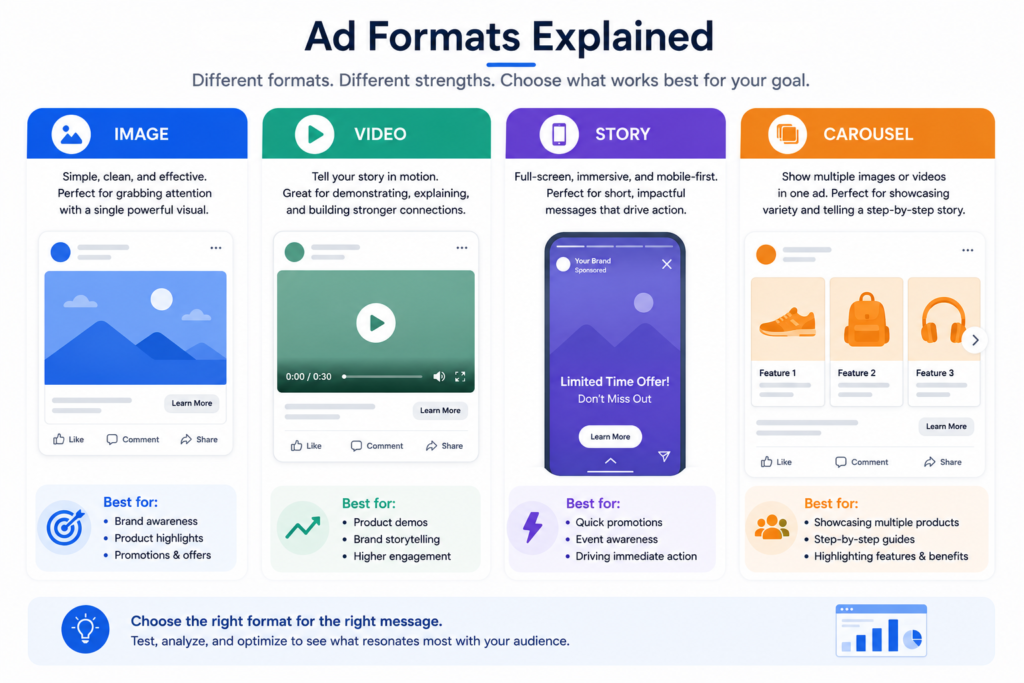
Image Ads — A single static image with copy and a CTA. Simple, fast to produce, and still highly effective, especially for clear product shots or strong offer-driven graphics.
Video Ads — Motion content, ideally under 15 seconds for feed placements, longer for storytelling or educational content in Reels/Stories. Video typically drives stronger engagement and is prioritized in AI-driven placements like Reels.
Carousel Ads — Multiple images or videos (up to 10 cards) that users swipe through, each with its own headline, description, and link. Excellent for showcasing multiple products, a step-by-step process, or a before/after story.
Collection Ads — A cover image or video followed by a grid of products, opening into a full-screen Instant Experience when tapped. Built specifically for ecommerce browsing behavior on mobile.
Instant Experience — A full-screen, mobile-optimized landing page that opens directly inside Facebook/Instagram after a tap, without leaving the app. Loads instantly and supports mixed media (video, image galleries, product grids), making it ideal for storytelling-heavy campaigns or catalog browsing.
Lead Ads — Ads that open Meta’s native Instant Form when clicked, capturing contact information without the person leaving the app. Reduces drop-off dramatically compared to sending traffic to an external form.
Reels Ads — Full-screen, vertical, sound-on video ads that appear between organic Reels content. Performance strongly favors native-feeling content over polished, obviously “ad-like” production.
Stories Ads — Full-screen vertical ads appearing between Stories. Best kept short (under 15 seconds), with clear, immediate messaging since users can tap through quickly.
Messenger Ads — Ads placed directly within the Messenger inbox feed, or “Click to Messenger” ads that open a chat from any placement.
Dynamic Ads / Catalog Ads — Automatically generated ads pulling directly from your product catalog, showing the exact products a person viewed or is likely to want, personalized per viewer. This is the backbone of ecommerce retargeting (e.g., “you left this in your cart”).
| Format | Best For | Ideal Placement |
|---|---|---|
| Image | Simple offers, quick production | Feed |
| Video | Storytelling, engagement | Reels, Stories, Feed |
| Carousel | Multiple products/steps | Feed |
| Collection | Ecommerce browsing | Feed, Instagram |
| Instant Experience | Immersive storytelling | Any (post-click) |
| Lead Ads | Low-friction lead capture | Feed, Stories |
| Dynamic/Catalog | Retargeting, personalization | Feed, Audience Network |
13. Ad Creative and Copywriting
If tracking is the nervous system of Meta Ads, creative is the heartbeat. In 2026, with AI-driven targeting doing most of the audience-finding work, creative has become the single biggest lever advertisers control — arguably more important than targeting itself.
Creative Strategy
Start with the customer, not the product. What problem are they experiencing right before they’d search for or need what you sell? Your creative should meet them at that emotional moment — frustration, curiosity, aspiration — rather than simply describing product features.
The Hook (First 3 Seconds)
On Meta platforms, you have roughly 1–3 seconds before someone decides to keep scrolling or keep watching. The hook is the single highest-leverage part of any video ad. Strong hooks typically do one of the following:
- Ask a direct, relatable question (“Still paying full price for X?”)
- Show a surprising visual result immediately (before/after, unexpected transformation)
- Use pattern interruption (something visually unusual that breaks the scroll rhythm)
- State a bold, specific claim tied to the viewer’s identity or problem
Copywriting Structure
Headline — Short, benefit-driven, ideally under 40 characters for full visibility across placements. This is often the second thing people read after the hook.
Primary Text — Lead with the biggest benefit or pain point in the first line (it’s the only part visible before “See More”). Keep paragraphs short — one or two lines each — and end with a clear reason to act now.
Description — Supporting detail beneath the headline, often used for secondary benefits, social proof, or urgency (limited stock, time-bound offer).
Call-to-Action (CTA) Button — Choose the CTA that matches actual user expectation. “Shop Now” for ecommerce, “Learn More” for informational content, “Sign Up” for leads, “Send Message” for conversational campaigns. Mismatched CTAs (e.g., “Shop Now” leading to a blog post) hurt both trust and Meta’s quality signals.
Visual Psychology
- Faces perform better than pure product shots in most feed contexts — humans are wired to stop scrolling on other humans’ faces and expressions.
- Text overlay should be minimal. Heavy text blocks reduce visual clarity and can hurt delivery in certain formats.
- Color contrast against the native feed (bright, saturated visuals) tends to stop the scroll better than muted, “on-brand-but-flat” palettes.
- Movement draws the eye — even subtle motion (a slow zoom, a hand gesture) outperforms fully static content in video placements.
UGC (User-Generated Content) Ads
UGC-style ads — filmed on a phone, presented by a real person rather than a polished studio production — consistently outperform highly produced ads across most consumer categories in 2026, because they blend into the native, authentic feel of Reels and Stories rather than reading as an obvious advertisement. This doesn’t mean quality doesn’t matter — it means authenticity matters more than production value.
Creative Testing
Never rely on a single ad. Test at minimum 3–5 creative variations per ad set, varying:
- The hook/opening 3 seconds
- The core angle or emotional appeal (price, quality, social proof, urgency, curiosity)
- The format (video vs. static vs. carousel)
Let each variation gather meaningful data (ideally a few thousand impressions minimum) before declaring a winner — judging creative performance after 200 impressions is statistically premature.
14. Optimization and Key Metrics
Understanding your metrics is what separates someone who “spends money on ads” from someone who actually manages a media budget. Let’s break down every core metric and what a healthy range generally looks like — though remember, “good” numbers vary significantly by industry, price point, and market.
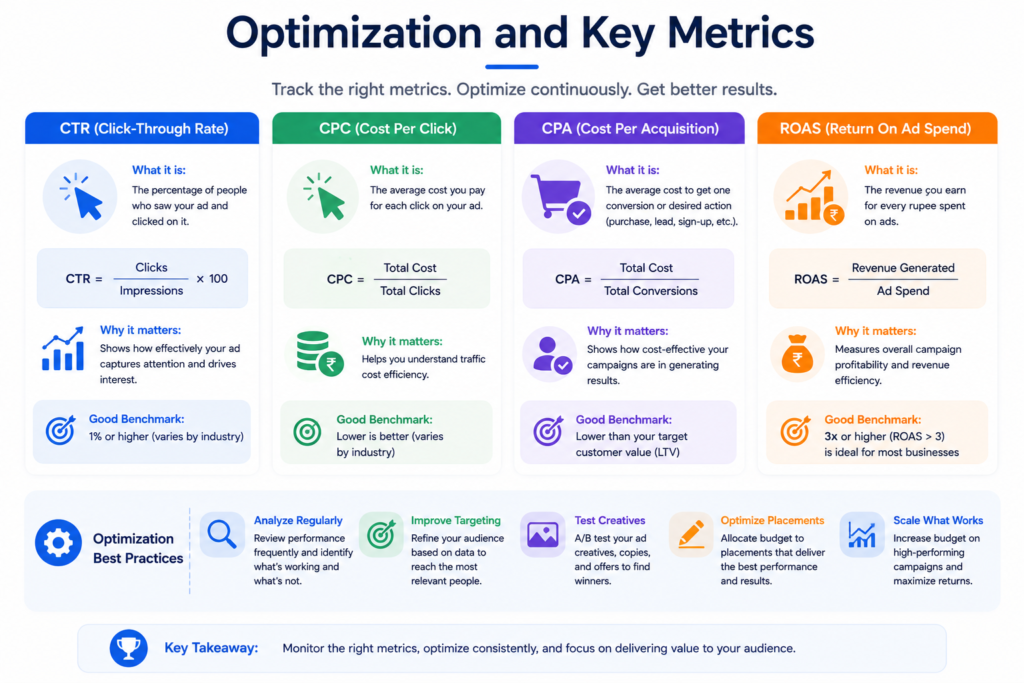
CTR (Click-Through Rate) — The percentage of people who saw your ad and clicked it. Signals how compelling your creative and offer are at a glance. Low CTR usually points to a weak hook or mismatched targeting.
CPM (Cost per 1,000 Impressions) — What you pay to reach 1,000 people. Rises with competition (auction pressure) and audience overlap; falls with better relevance and less competitive time periods.
CPC (Cost per Click) — What you pay per click. A function of CPM and CTR — improving CTR is usually the fastest way to lower CPC without touching your bid.
CPA (Cost per Action/Acquisition) — What you pay per desired outcome — a lead, a purchase, a sign-up. The metric most businesses ultimately care about most, since it ties directly to unit economics.
ROAS (Return on Ad Spend) — Revenue generated divided by ad spend. A ROAS of 4 means every $1 spent generated $4 in revenue. Remember: ROAS is revenue, not profit — always compare it against your actual margins to know true profitability.
Frequency — The average number of times a unique person has seen your ad. Rising frequency with falling performance signals ad fatigue — time to refresh creative or expand the audience.
Quality Ranking, Engagement Rate Ranking, Conversion Rate Ranking — Meta’s relative comparisons of your ad’s quality, expected engagement, and expected conversion rate against other ads competing for the same audience. Available in ad-level diagnostics; consistently “Below Average” rankings are a clear signal something (creative, landing page, offer) needs work.
Conversion Rate — The percentage of clicks (or landing page visits) that complete your desired action. Heavily influenced by landing page speed, trust signals, mobile experience, and offer clarity — not just the ad itself.
A/B Testing
Meta’s built-in A/B Test tool lets you isolate a single variable — creative, audience, placement, or delivery optimization — and split your budget evenly to get a statistically fair comparison, rather than relying on the algorithm’s uneven natural distribution across ad sets (which can bias comparisons).
Rules for valid testing:
- Test one variable at a time.
- Give the test enough budget and time to reach statistical significance (Meta will indicate this).
- Don’t declare a winner based on a few dozen clicks — wait for meaningful conversion volume.
Scaling: Horizontal vs. Vertical (Revisited for Optimization Context)
Once a campaign proves profitable, resist the urge to 3x the budget overnight. Vertical scaling (gradual budget increases) preserves stability; horizontal scaling (duplicating winning ad sets, expanding to new audiences or geographies) adds volume without overloading a single ad set’s ability to find efficient impressions. Most experienced media buyers use a mix of both, scaling vertically to a point, then horizontally to keep growing beyond what one ad set can efficiently absorb.
| Metric | What It Tells You | Improve By |
|---|---|---|
| CTR | Creative/offer appeal | Stronger hook, clearer offer |
| CPM | Audience competition | Better relevance, wider audience |
| CPA | Cost efficiency | Better targeting, creative, landing page |
| ROAS | Revenue efficiency | Higher AOV, better funnel, retargeting |
| Frequency | Audience fatigue | Refresh creative, expand audience |
15. Reporting, Attribution, and Analytics
Ads Reporting and Custom Reports
Meta Ads Manager’s Reporting tab lets you build custom breakdowns — by age, gender, placement, region, device, and time of day — and save them as templates you can reuse weekly or monthly. Go beyond the default columns; add ROAS, CPA, and Frequency to every report you review regularly.
Attribution
Attribution determines which touchpoint gets “credit” for a conversion. Meta’s default attribution setting (commonly 7-day click, 1-day view) means a purchase happening within 7 days of someone clicking your ad, or within 1 day of simply viewing it, gets attributed to that ad. Understand that Meta’s in-platform reporting will often show higher numbers than a strict last-click model (like Google Analytics) would, simply because of how view-through attribution works — this isn’t Meta “lying,” it’s a different (and valid) attribution methodology.
UTM Tracking
UTM parameters appended to your ad links (e.g., ?utm_source=facebook&utm_medium=paid&utm_campaign=summer_sale) let you track traffic and conversions inside third-party analytics tools like GA4, independent of Meta’s own reporting. This gives you a second, cross-checked data source — essential for catching discrepancies and understanding true blended performance across all your marketing channels.
GA4 Integration
Connecting Google Analytics 4 alongside Meta Ads reporting lets you compare on-platform numbers against an independent, cross-channel view of user behavior — particularly valuable for understanding assisted conversions, where Meta ads might not get last-click credit in GA4 but clearly influenced the buying decision. Neither platform alone tells the full story; use both together.
16. AI Features in Meta Ads (2026)
By 2026, artificial intelligence isn’t a bolt-on feature inside Meta Ads — it’s the core operating layer underneath nearly everything you do in Ads Manager. Understanding these tools well is now a baseline skill, not an “advanced” one.
Advantage+ Shopping Campaigns — A fully AI-managed campaign type for ecommerce that automatically handles audience targeting, creative combinations, placements, and budget allocation across your entire product catalog, requiring minimal manual segmentation from the advertiser.
Advantage+ Creative — AI-powered creative enhancement that can automatically generate variations of your ad — different backgrounds, text overlays, cropping for different placements, and even AI-generated image expansion to fit vertical or square formats from a single source image.
Advantage+ Audience — Covered in Section 7 — AI-driven audience targeting that uses signals rather than hard-coded filters to find converters.
AI Targeting and Delivery Optimization — The underlying system continuously reallocates impressions in real time across your active ad sets and creatives, favoring combinations most likely to convert based on constantly updating signal data.
AI Recommendations — Ads Manager surfaces proactive suggestions (in the Recommendations tab) based on account-level patterns — things like “this ad set may benefit from broader targeting” or “your Pixel’s Event Match Quality could improve.” Worth reviewing regularly, though not every recommendation fits every business — apply judgment before accepting automated suggestions.
Generative AI Creative Tools — Native tools inside Ads Manager can now generate background variations, text suggestions, and even full image variations from a product photo, cutting production time for advertisers without a design team.
Automated Rules — Not new to 2026, but increasingly AI-assisted: automated rules let you set conditions (“if CPA exceeds $X for 3 days, pause ad set”) that run without manual daily monitoring, freeing up time for strategy over micromanagement.
18. Industry Use Cases
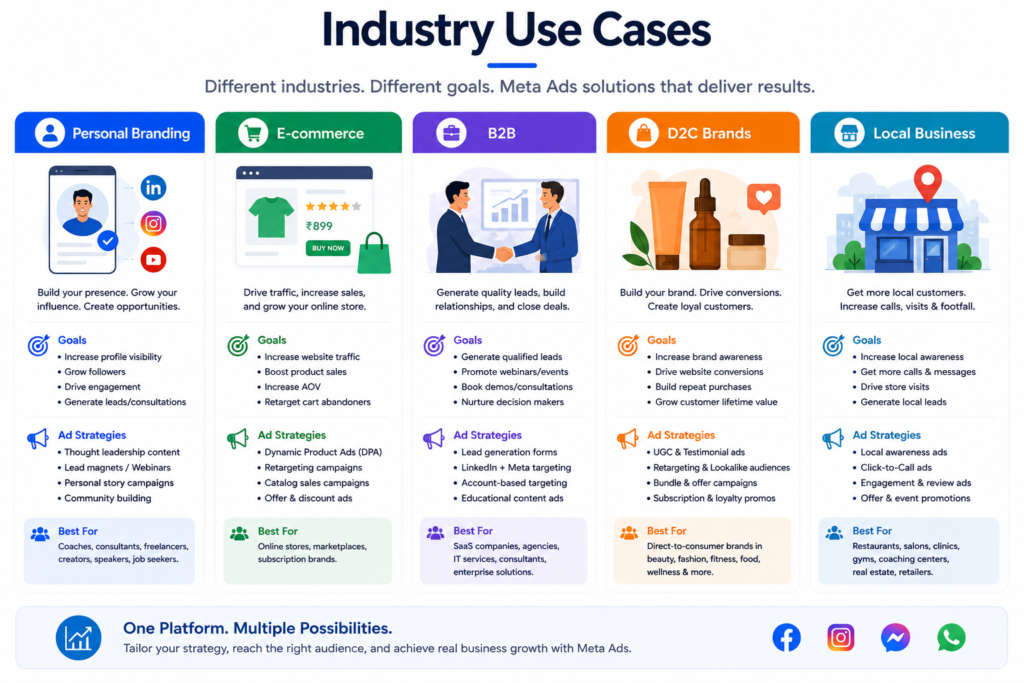
Ecommerce — Advantage+ Shopping campaigns, dynamic catalog retargeting for cart abandoners, and Lookalikes built from your top purchasers. Prioritize Purchase-optimized Sales campaigns paired with a dedicated retargeting campaign for browsers and cart abandoners.
Local Business — Location-based targeting within a set radius, Click-to-WhatsApp or Click-to-Messenger for bookings, and Engagement campaigns to build local social proof. Awareness combined with a store-visit-friendly landing experience often works well here.
Service Business — Leads objective with Instant Forms, qualifying questions to filter serious inquiries, and fast CRM-integrated follow-up. Video testimonials tend to outperform generic service description ads.
Education — Leads campaigns promoting free resources (webinars, guides) as top-of-funnel, then retargeting with enrollment-focused Sales or Leads campaigns closer to intake deadlines.
Healthcare — Careful compliance with restricted-category policy; focus on Awareness and Traffic to educational content rather than aggressive claims; Leads objective for appointment bookings where permitted by local regulation.
Real Estate — Leads objective with Instant Forms segmented by buy/rent/budget; Carousel and Collection ads to showcase multiple properties; Lookalikes built from past closed-deal contacts.
B2B — LinkedIn is often assumed to be the default for B2B, but Meta’s precise Custom Audience and Lookalike targeting (from CRM data) makes it a strong complementary channel; Leads objective paired with gated content (whitepapers, case studies) performs well.
Personal Branding — Engagement and video view campaigns to build an audience, then retarget engaged viewers with a Leads or Sales campaign for products, coaching, or courses.
Coaching — Leads objective for discovery calls, retargeting webinar attendees and video viewers with a direct enrollment offer, and UGC-style testimonial creative.
Freelancers — Small, tightly-targeted Leads or Traffic campaigns to a portfolio site, retargeting website visitors with direct outreach or a simple contact-form Sales/Leads push, since budgets are typically limited and every dollar needs to work hard.
19. 25+ Common Mistakes (And How to Fix Them)
- No Pixel or CAPI installed before launching ads. Fix: Set up tracking fully before spending a single dollar.
- Testing too many variables at once. Fix: Change one thing at a time — creative, audience, or budget, not all three together.
- Editing campaigns multiple times a day. Fix: Let the learning phase run at least 3–4 days before making changes.
- Fragmenting budget across too many small ad sets. Fix: Consolidate into fewer, better-funded ad sets.
- Using Traffic objective when the goal is Sales. Fix: Match objective to actual business outcome.
- Ignoring the Learning Phase and judging performance too early. Fix: Wait for at least 50 conversions or a full week before evaluating.
- Never testing more than one ad creative. Fix: Run 3–5 creative variations per ad set minimum.
- Overlapping audiences across multiple ad sets, causing internal competition. Fix: Check Audience Overlap tool and consolidate.
- Setting unrealistic Cost Caps on day one. Fix: Start with Highest Volume to gather real cost data first.
- Scaling budget too aggressively (100%+ overnight). Fix: Increase gradually, 15–20% every 2–3 days.
- Ignoring Frequency and letting ad fatigue set in. Fix: Monitor frequency; refresh creative when it climbs past 3–4 with declining CTR.
- Weak or missing hooks in video ads. Fix: Invest disproportionate effort in the first 3 seconds.
- Sending traffic to a slow-loading landing page. Fix: Optimize page speed — every second of load time costs conversions.
- Mismatched CTA and destination. Fix: Ensure the button promise matches exactly what the user lands on.
- Not using retargeting at all. Fix: Always run a dedicated retargeting campaign alongside cold prospecting.
- Relying only on Pixel without Conversions API. Fix: Implement both for reliable, deduplicated data.
- Skipping domain verification. Fix: Verify your domain early to unlock proper iOS event configuration.
- Choosing vanity metrics (likes, reach) over business metrics (CPA, ROAS). Fix: Report on outcomes tied to revenue, not just visibility.
- Assuming narrow targeting always beats broad targeting. Fix: Test Advantage+ Audience against Saved Audiences with real data, not assumptions.
- Not excluding existing customers from cold prospecting campaigns. Fix: Build exclusion audiences to avoid wasting spend re-targeting people who already bought.
- Ignoring placement-level performance data. Fix: Regularly review the placement breakdown and exclude consistently underperforming ones.
- Copy-pasting competitor ad ideas without adapting them to your own audience and offer. Fix: Use competitor research for inspiration, not direct replication.
- Not having qualifying questions on Lead Ads. Fix: Add 2–3 filtering questions to improve lead quality.
- Delayed follow-up on leads. Fix: Contact new leads within minutes using automated CRM integration.
- Panicking and pausing campaigns after one bad day. Fix: Evaluate performance over a rolling 5–7 day window, not single days, which are naturally volatile.
- No clear naming convention, making the account impossible to analyze later. Fix: Adopt a consistent naming system from day one.
- Ignoring Meta’s ad policies for sensitive categories and getting repeatedly rejected. Fix: Read the specific policy page before creating ads in restricted categories.
20. Best Practices Checklist
Before Launch
- Pixel and Conversions API both installed and tested
- Domain verified in Business Settings
- Standard events mapped correctly to the right pages
- Clear campaign objective matched to actual business goal
- Naming convention decided and applied consistently
Campaign Setup
- Advantage+ Campaign Budget considered for multi-ad-set campaigns
- Automatic Placements used unless there’s a strong reason not to
- Retargeting campaign built alongside cold prospecting
- Existing customers excluded from cold campaigns
- 3–5 creative variations per ad set
Ongoing Management
- Performance reviewed on a rolling 5–7 day window, not daily panic-checks
- Frequency monitored for ad fatigue
- Placement and demographic breakdowns reviewed weekly
- Budget scaled gradually (15–20% increases)
- Creative refreshed regularly, especially for retargeting audiences
- Leads followed up within minutes via CRM integration
Conclusion
Meta Ads rewards people who understand the system, not just the buttons. You now know how the auction actually decides who wins a placement, how to build tracking that gives the algorithm accurate signals, how to structure campaigns that don’t fight against themselves, and how to read your numbers like someone who’s done this for years — not months.
None of this happens overnight. The advertisers who win with Meta Ads long-term are the ones who treat it as an ongoing discipline — testing consistently, tracking honestly, and adjusting based on data rather than guesswork or panic. You’ve now got the complete framework. The next step is simple: open Ads Manager, apply what you’ve learned here one section at a time, and start building real campaign data of your own.
That’s how every experienced media buyer got good at this — not by reading one more guide, but by running the guide they already had. You just read that guide. Now go run it.